> This page is for version dev.
> For other versions, use one of these documentation indexes:
> - Latest (v1.6.1) (default): https://docs.nvidia.com/dynamo/latest/llms.txt
> - dev: https://docs.nvidia.com/dynamo/dev/llms.txt
> - v1.6.1: https://docs.nvidia.com/dynamo/v1.6.1/llms.txt
> - v1.6.0: https://docs.nvidia.com/dynamo/v1.6.0/llms.txt
> - v1.5.1: https://docs.nvidia.com/dynamo/v1.5.1/llms.txt
> - v1.5.0: https://docs.nvidia.com/dynamo/v1.5.0/llms.txt
> - v1.4.2: https://docs.nvidia.com/dynamo/v1.4.2/llms.txt
> - v1.4.1: https://docs.nvidia.com/dynamo/v1.4.1/llms.txt
> - v1.4.0: https://docs.nvidia.com/dynamo/v1.4.0/llms.txt
> - v1.3.0: https://docs.nvidia.com/dynamo/v1.3.0/llms.txt
> - v1.2.1: https://docs.nvidia.com/dynamo/v1.2.1/llms.txt
> - v1.2.0: https://docs.nvidia.com/dynamo/v1.2.0/llms.txt
> - v1.1.1: https://docs.nvidia.com/dynamo/v1.1.1/llms.txt
> - v1.1.0: https://docs.nvidia.com/dynamo/v1.1.0/llms.txt
> - v1.0.2: https://docs.nvidia.com/dynamo/v1.0.2/llms.txt
> - v1.0.1: https://docs.nvidia.com/dynamo/v1.0.1/llms.txt
> - v1.0.0: https://docs.nvidia.com/dynamo/v1.0.0/llms.txt
> - v0.9.1: https://docs.nvidia.com/dynamo/v-0-9-1/llms.txt
> - v0.9.0: https://docs.nvidia.com/dynamo/v-0-9-0/llms.txt
> - v0.8.1: https://docs.nvidia.com/dynamo/v-0-8-1/llms.txt
> - v0.8.0: https://docs.nvidia.com/dynamo/v-0-8-0/llms.txt
> - v0.7.1: https://docs.nvidia.com/dynamo/v-0-7-1/llms.txt
> - v0.7.0: https://docs.nvidia.com/dynamo/v-0-7-0/llms.txt
> For clean Markdown content of this page, append .md to this URL. For the complete documentation index, see https://docs.nvidia.com/dynamo/llms.txt. For full content including API reference and SDK examples, see https://docs.nvidia.com/dynamo/llms-full.txt.
# Voice Pipelines
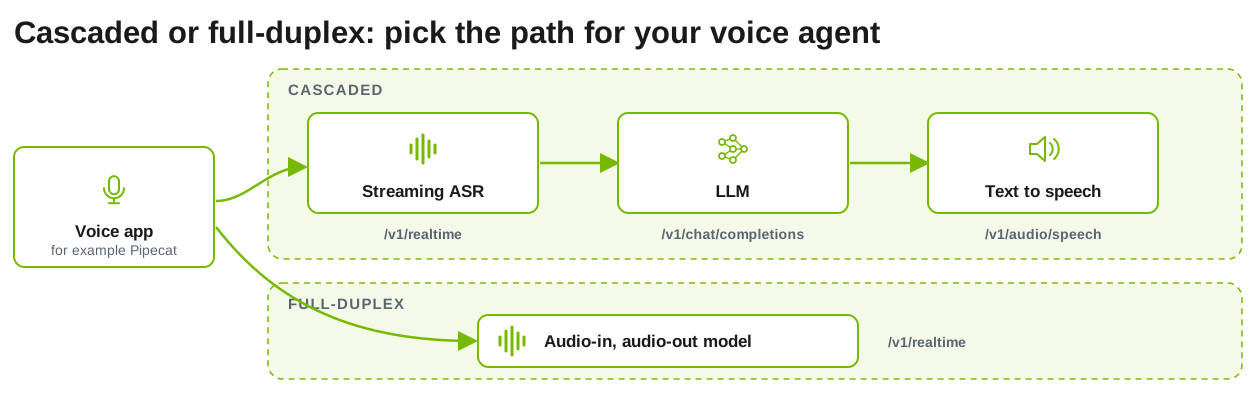
Dynamo serves voice workloads through OpenAI-compatible endpoints. Run separate
automatic speech recognition (ASR), LLM, and text-to-speech (TTS) workers for a
cascaded pipeline, or one vLLM-Omni model that takes audio in and returns audio
out.
## Endpoints
| Stage | Endpoint | Output | Guide |
| --- | --- | --- | --- |
| Streaming ASR | `/v1/realtime` WebSocket, `session.type="transcription"` | Transcript events | [Speech to Text](/dynamo/dev/speech/speech-to-text) |
| LLM | `/v1/chat/completions` with `stream: true` | Text deltas | [Local Guide](/dynamo/dev/cli/getting-started/quickstart) |
| TTS | `/v1/audio/speech` | Audio, streamed for `wav` and `pcm` | [Text-to-Speech](/dynamo/dev/speech/text-to-speech) |
| Audio-in, audio-out model | `/v1/realtime` WebSocket, `session.type="realtime"` | Text and audio events | [Speech-to-Speech](/dynamo/dev/speech/speech-to-speech) |
For a cascaded voice agent, connect an application such as Pipecat to the three
stage endpoints. The application owns conversation history, turn detection,
interruptions, and orchestration; Dynamo serves and routes each stage.
## Set up the backend
The speech pages in this section run on vLLM (speech to text) and vLLM-Omni (TTS
and speech-to-speech).
- Speech to text needs a working
[vLLM backend setup](/dynamo/dev/knowledge-base/modular-components/backends/v-llm/overview#installation)
plus vLLM's audio dependencies:
```bash
pip install 'vllm[audio]'
```
- Text-to-speech and speech-to-speech need vLLM-Omni:
[vLLM-Omni](https://github.com/vllm-project/vllm-omni) generates images, video, and audio through `python -m dynamo.vllm.omni`.
**Prerequisites**
- A working vLLM backend setup.
- An `amd64` host. Dynamo container builds do not install vLLM-Omni on `arm64`.
Dynamo container images include vLLM-Omni. A PyPI installation of `ai-dynamo[vllm]` does not include it. For a source installation, install the vLLM-Omni release that matches your vLLM version:
```bash
pip install git+https://github.com/vllm-project/vllm-omni.git@
```
The `agg_omni_*.sh` and `disagg_omni_glm_image.sh` launchers start the frontend and workers directly on one host. They are intended for local development and testing and do not create a `DynamoGraphDeployment`.
Generated media is written through [fsspec](https://filesystem-spec.readthedocs.io/) storage. The default is `file:///tmp/dynamo_media`. Set `--media-output-fs-url` for S3, GCS, or Azure Blob storage, and optionally `--media-output-http-url` to rewrite the URLs returned in responses.
vLLM-Omni ships built-in stage configurations for supported models. Set `--stage-configs-path` only to override them.
See the [vLLM backend setup](/dynamo/dev/knowledge-base/modular-components/backends/v-llm/overview) and the [vLLM-Omni Configuration reference](/dynamo/dev/reference/backends/v-llm-omni-configuration) for every flag.
The Nemotron Speech cascade deploys Nemotron ASR and Magpie TTS Speech NIMs with
Dynamo adapters, plus a Nemotron LLM served by vLLM. ASR, LLM, and TTS run in
separate pods.
Follow the
[deployment and smoke-test instructions](https://github.com/ai-dynamo/dynamo/tree/main/examples/nemotron_speech_cascaded_pipeline#deploy-on-kubernetes)
in the example. It requires compatible source-built Dynamo images; check the
example's runtime-image requirements before you deploy. The deployment smoke test
checks the speech endpoints, not a complete browser voice agent. See
[external orchestration](https://github.com/ai-dynamo/dynamo/tree/main/examples/nemotron_speech_cascaded_pipeline#external-orchestration)
for client integration.
## Run a Pipeline Locally
Bring up and test each stage on its own before you connect them:
1. Start an ASR worker and stream an audio file to it:
[Speech to Text](/dynamo/dev/speech/speech-to-text).
2. Start an LLM with any vLLM, SGLang, or TensorRT-LLM launcher, for example
`bash examples/backends/vllm/launch/agg.sh`.
3. Start a TTS worker and synthesize a reply:
[Text-to-Speech](/dynamo/dev/speech/text-to-speech).
Each launcher starts its own frontend on port 8000, so test the stages one at a
time on a single host.
## Speech Recognition on Kubernetes
Two DynamoGraphDeployment manifests serve Qwen3-ASR. For the request and response
formats and the local launchers, see
[Speech Recognition (ASR)](/dynamo/dev/knowledge-base/modular-components/backends/v-llm/vllm-multimodal#speech-recognition-asr)
in the vLLM multimodal guide.
| Manifest | Endpoint | Worker mode |
| --- | --- | --- |
| [`agg_asr.yaml`](https://github.com/ai-dynamo/dynamo/blob/main/examples/backends/vllm/deploy/agg_asr.yaml) | `/v1/chat/completions` with an `audio_url` content part | `--enable-multimodal` |
| [`agg_asr_realtime.yaml`](https://github.com/ai-dynamo/dynamo/blob/main/examples/backends/vllm/deploy/agg_asr_realtime.yaml) | `/v1/realtime` WebSocket with `session.type="transcription"` | `--realtime` |
A `--realtime` worker cannot also run with `--enable-multimodal`, so each manifest
serves one endpoint. Deploy both to serve both endpoints.
### Audio Transfer Between Pods
In `agg_asr.yaml`, the frontend and worker run in separate pods, which do not share
`/dev/shm`. The default shared-memory transfer of processed audio cannot reach the
worker, so the worker transcribes the prompt without the audio and returns
`language None`. The frontend's transfer settings decide where the audio
is processed:
- **`DYNAMO_DISABLE_NIXL_MM=1`, set in the manifest:** The frontend forwards the
audio URL, and the worker loads and processes the audio itself.
- **`DYNAMO_MM_TRANSFER=nixl`:** The frontend sends the processed audio to the
worker over NIXL, which spares the worker a second pass over the audio. To use
it, remove `DYNAMO_DISABLE_NIXL_MM` from the frontend and set
`DYNAMO_MM_TRANSFER=nixl` there.
- **`Qwen/Qwen3-ASR-1.7B-hf` behind the default Rust frontend:** The worker always
loads the audio, so neither setting applies.
The frontend checks `DYNAMO_DISABLE_NIXL_MM` before it selects a transfer mode.
Setting `DYNAMO_MM_TRANSFER=nixl` while `DYNAMO_DISABLE_NIXL_MM=1` remains has no
effect.
### Image Requirements
The Dynamo vLLM runtime images lack two packages that these manifests can need:
- **PyAV**, for `agg_asr.yaml` to accept audio at a rate other than the model's
16 kHz. The frontend runs the Python chat processor and resamples audio too, so
run both components from the image.
- **`scipy`**, which the `agg_asr_realtime.yaml` worker uses to resample the 24 kHz
stream to 16 kHz. Without it, each session ends with an empty transcript.
A `pip install` in a running pod does not survive a restart, so bake the packages
into an image and set it as each component's `image`:
```dockerfile
FROM nvcr.io/nvidia/ai-dynamo/vllm-runtime:x.y.z
# Audio at sample rates other than 16 kHz (agg_asr.yaml)
RUN python -m dynamo.common.utils.install_media_decoders vllm
# Streaming transcription (agg_asr_realtime.yaml)
RUN pip install 'scipy>=1.14,<2'
```
See [Additional Media Decoders](/dynamo/dev/image-understanding/additional-media-decoders#kubernetes)
for what the installer changes.
## Incremental Text Input
Incremental text input lets an orchestrator send ASR text to the LLM while the user is still speaking. The worker starts prefilling the text it has received so far, in full KV cache blocks, so those tokens are already in the prefix cache when the final request arrives. The client sends `input_text.append` events with the partial text, then `input_text.commit` with the final text to start generation, or `input_text.clear` to discard the prefill work.
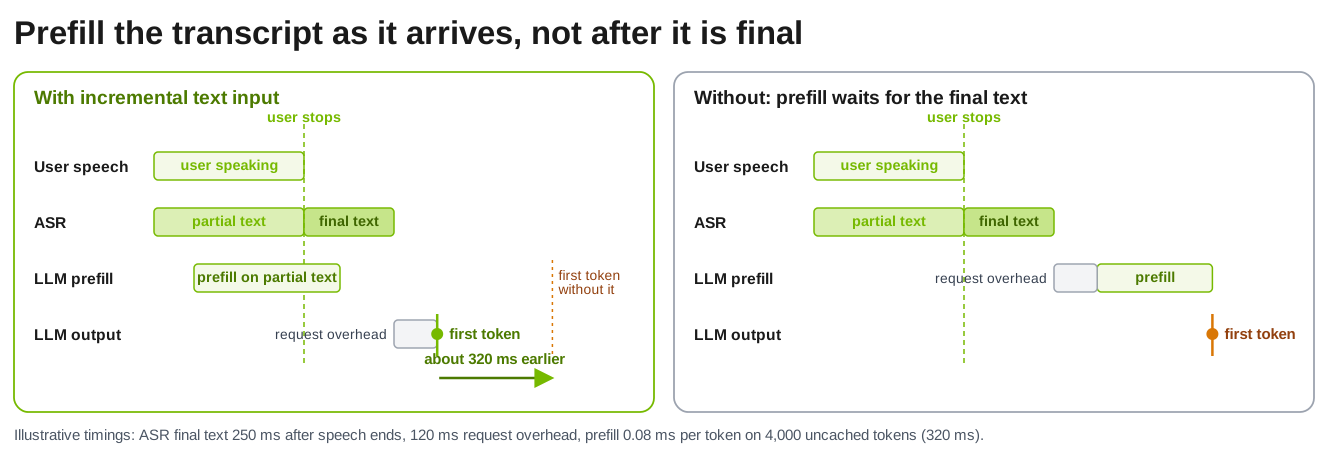
It applies to text-only `/v1/realtime` sessions on aggregated vLLM workers, without tools or disaggregation, and it needs prefix caching. Short or revised input can yield no benefit. The input events are Dynamo extensions, not standard OpenAI events, and realtime text does not yet apply `--dyn-reasoning-parser`. ASR and TTS orchestration remain external. Session recovery across worker failures is a further goal and is not provided by the examples above.