

Advanced Performance Tuning
Measure a deployed configuration and tune the remaining workload-specific parameters
Use this guide after you have selected an initial deployment topology. It covers the workload-specific adjustments that remain after sizing, rather than repeating the complete sizing and deployment workflow.
Before tuning:
- Use Sizing with AIConfigurator to select tensor parallelism, pipeline parallelism, and initial replica counts.
- Use Deploy with DGD to apply those values to a Kubernetes deployment.
- If you separate prefill and decode workers, follow Disaggregated Serving to configure and verify the KV transfer path first.
- Establish a repeatable workload with Benchmarking with AIPerf.
The configuration produced by a sizing tool is a starting point. Actual request lengths, concurrency, prefix reuse, backend versions, and cluster networking can shift the best operating point.
Tune with a representative workload
Use the same model, input sequence length (ISL), output sequence length (OSL), concurrency, and service-level objectives for every comparison. Change one parameter group at a time and record at least:
- Time To First Token (TTFT)
- Inter-Token Latency (ITL) or Time Per Output Token (TPOT)
- Request throughput and output-token throughput
- Prefill queue depth
- Decode KV-cache utilization
- GPU utilization and out-of-memory failures
Run multiple passes before accepting a result. A change that improves peak throughput can still be a regression if it violates the latency objective or reduces stability under sustained load.
Tune the KV block size
KV block size affects both transfer efficiency and prefix-cache reuse:
- Smaller blocks improve cache granularity but create smaller KV-transfer chunks and more bookkeeping.
- Larger blocks improve transfer efficiency but can reduce the prefix-cache hit ratio by rounding reusable prefixes to coarser boundaries.
A KV block size of 128 tokens is a useful starting point for many dense-model disaggregated deployments, but the exact option name and supported values are backend-specific and 128 is not a universal optimum. Benchmark nearby supported values with the same prefix distribution and make sure prefill and decode workers use compatible KV layouts.
Tune prefill capacity
A prefill worker normally minimizes TTFT when it runs at the smallest workload size that saturates the GPU. Very short prompts can underutilize the device, while very long prompts increase attention cost and absolute TTFT.
The following example shows that tradeoff for Llama 3.3 70B with NVFP4 quantization on a B200 using vLLM TP1 and prefix caching disabled:
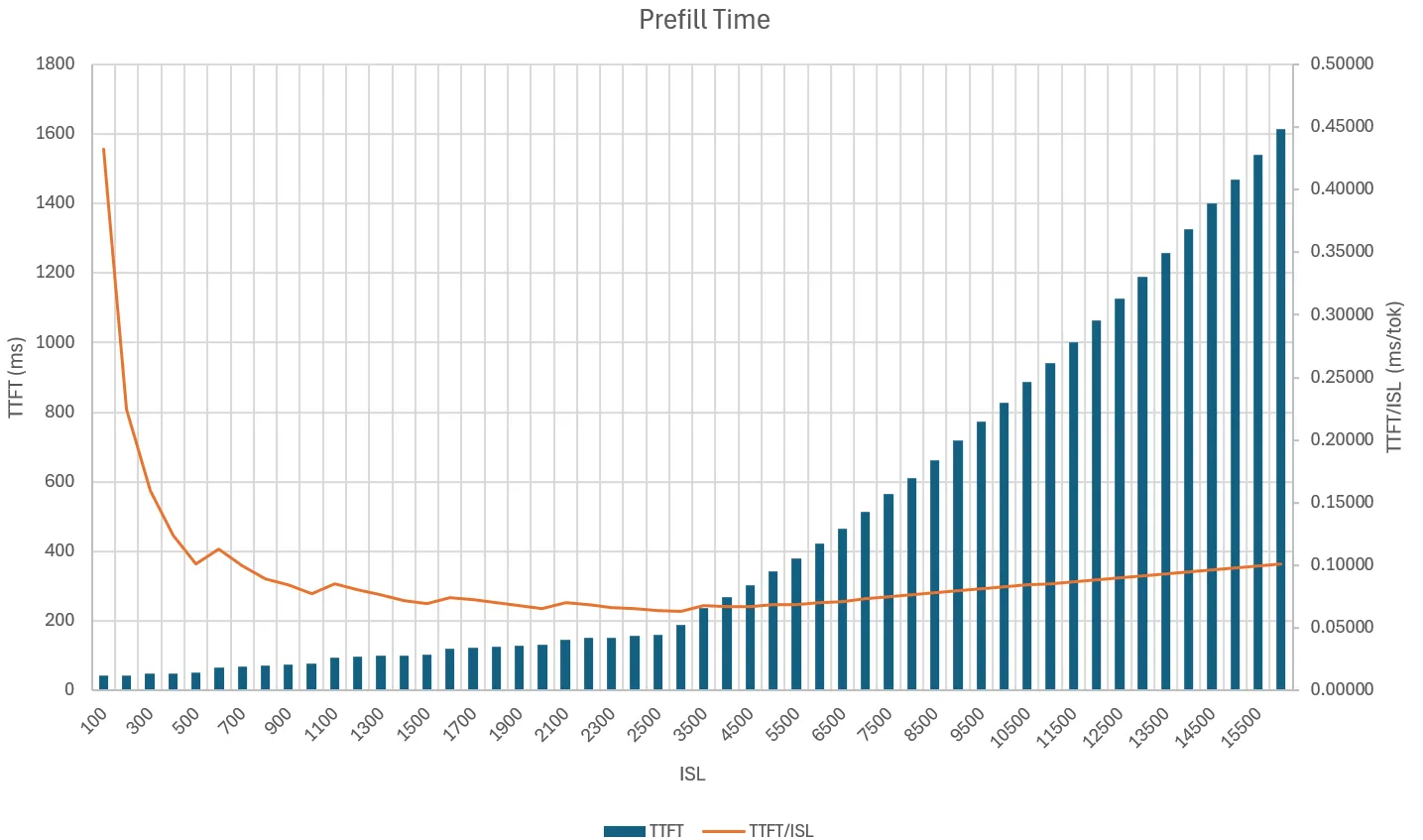
Use AIPerf to find the saturation region for your own model and hardware. If prefill requests queue while decode capacity remains available, compare these changes separately:
- Add a prefill replica.
- Increase the amount of work admitted per prefill iteration using the backend’s supported batching or token-limit controls.
- Adjust the router’s local-versus-remote prefill policy. See Router Configuration and Tuning.
Prefer the smallest change that meets the TTFT target. Adding prefill replicas consumes GPUs that could otherwise provide decode KV-cache capacity.
Tune decode capacity
Decode limits trade intermediate-buffer memory against KV-cache capacity. Larger batch and token limits can increase batching opportunities, but they also reserve more memory outside the KV cache. Reducing those limits can make room for more cached sequences, although limits that are too small can lower throughput.
Tune the backend’s maximum batch and token controls together:
- Start from the AIConfigurator or recipe values.
- Increase concurrency until decode KV-cache utilization or ITL reaches the target limit.
- Change one limit at a time and repeat the same workload.
- Reject configurations that improve throughput only by exceeding the ITL or TPOT objective.
Exact option names and defaults belong to the backend configuration references: vLLM, SGLang, and TensorRT-LLM.
Adjust prefill and decode replicas
Treat replica counts as a response to observed bottlenecks rather than as fixed ratios:
For automated, metrics-driven redistribution between the pools, use the Planner. For a fresh topology search, rerun AIConfigurator with workload parameters that match the measured traffic.
Bound frontend host memory growth
The frontend allocates host memory per request for tokenization, routing bookkeeping, and response assembly. With the default glibc allocator, freed memory may be retained in allocator arenas instead of being returned to the operating system, so frontend resident memory can climb to a high-water mark under load and may not drop when the load stops. This retention is allocator behavior rather than a leak.
To bound the retained footprint, preload jemalloc with decay enabled on the frontend container. See
Host memory allocator
for the LD_PRELOAD and MALLOC_CONF values and for which container images ship libjemalloc2.
To verify the change, run the same workload and track the frontend container’s memory usage
(memory.current on cgroup v2, or memory.usage_in_bytes on cgroup v1) across repeated benchmark
rounds and through an idle window after the load stops.
With glibc the value typically stays at its peak, while with jemalloc and decay it may settle toward a floor. Those decay settings do not guarantee that purging occurs during an idle window; include an idle period in the benchmark to confirm whether memory actually settles for your workload.