

Planner Design
Tier 3 design documentation for contributors and architects. For user-facing docs, see docs/components/planner/.
Overview
The Planner is Dynamo’s autoscaling controller. It supports two scaling modes: throughput-based (using profiling data and traffic prediction) and load-based (using real-time engine metrics and online regression). This document covers the internal architecture, algorithms, and design trade-offs for both modes.
Runtime Pipeline
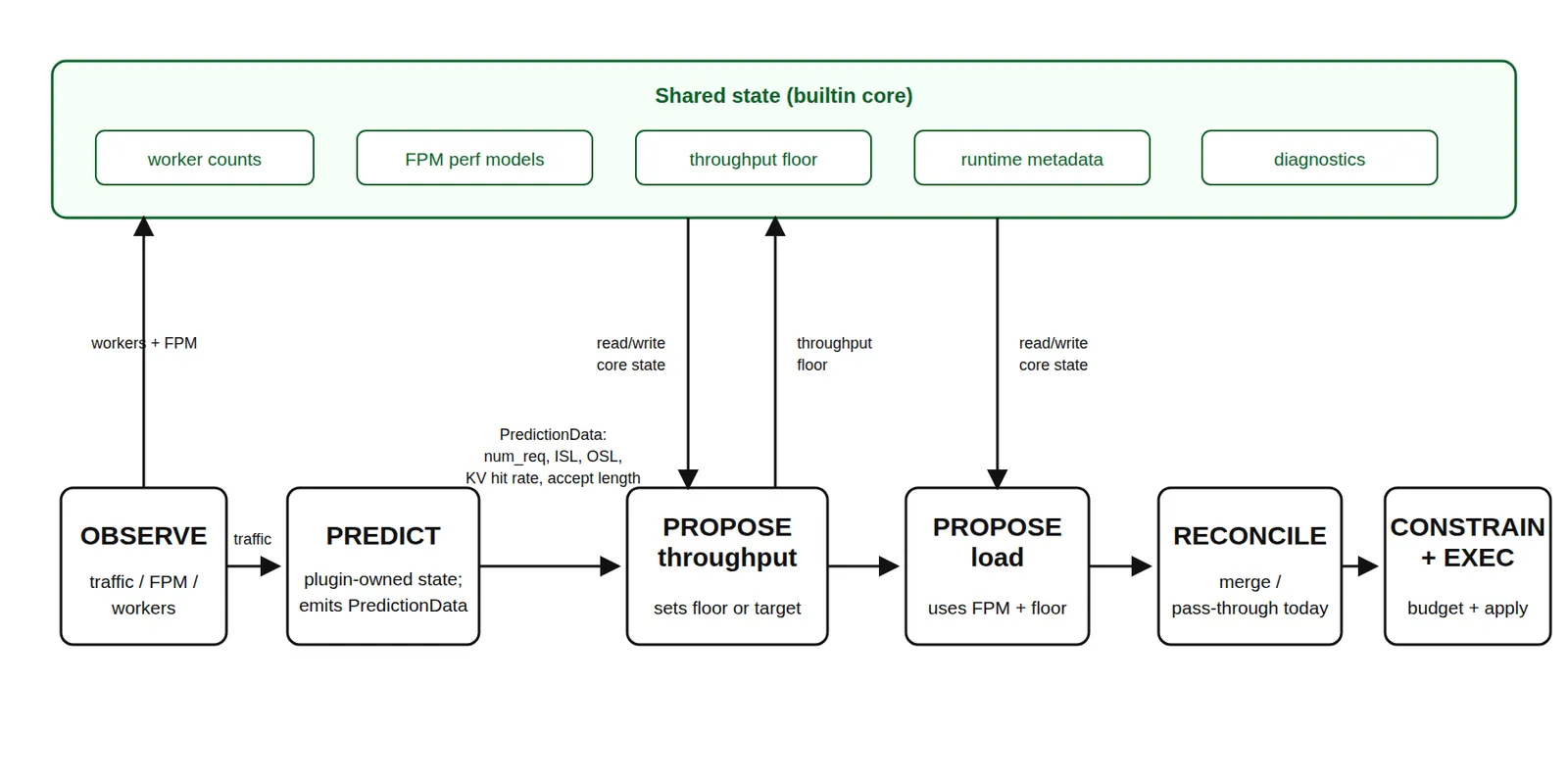
The runtime planner is driven by OrchestratorEngineAdapter, which wraps the
local scaling algorithms as builtin plugins and runs the same plugin pipeline
used by external gRPC plugins.
- OBSERVE:
NativePlannerBaseand the engine adapter collect worker counts, traffic metrics, and forward-pass metrics. Observations are exposed throughPipelineContext.observations. - PREDICT:
builtin_load_predictruns on the throughput interval. It consumes traffic observations and emits predicted request count, ISL, OSL, KV hit rate, and speculative accept length for this tick. - PROPOSE:
builtin_throughput_proposeconsumes same-tick predictions and updates the throughput lower bound.builtin_load_proposeconsumes FPM and worker observations and applies the load-based +/-1 scaling algorithm. - RECONCILE / CONSTRAIN: The generic pipeline merges proposals from builtin and external plugins. After CONSTRAIN, the engine adapter applies the local planner’s final effective component minimums and GPU-budget invariants before returning any scaling effect.
- EXECUTE: The adapter returns
PlannerEffects.scale_to;NativePlannerBaseapplies those targets through the configured connector.
For compatibility with existing configs and DGDR-generated planner payloads,
load_adjustment_interval_seconds and throughput_adjustment_interval_seconds
still define the builtin plugin fire intervals. The base
scheduling.scale_interval_seconds defaults to the greatest common divisor of
those enabled intervals, so existing load and throughput fire times are preserved.
Why Two Scaling Loops?
The two builtin scaling loops serve different control horizons. Throughput-based scaling is the slower predictive capacity loop: it uses a longer traffic window, load prediction, and profiling or perf-model capacity estimates to provision for sustained demand. This avoids reacting to short-lived metric noise and gives scale-out enough time to complete before the predicted load arrives.
Load-based scaling is the faster reactive SLA-correction loop. It uses current FPM, queue, worker-count, and online perf-model observations to handle short-term overload, prediction or profiling error, runtime metadata changes such as KV hit rate or speculative accept length, and the actual state observed after previous scaling actions.
When both loops are enabled, throughput-based scaling sets the replica lower bound, and load-based scaling runs more frequently above that floor. This keeps capacity that was predicted for near-future demand from being removed because of short idle periods, while still allowing the planner to react faster than the throughput interval when real-time SLA pressure appears.
Builtin Shared State
The pipeline context is a per-tick data plane: observations, predictions, and
proposals are produced for the current tick and passed through the public plugin
API. The builtin local planner also needs cross-tick state to preserve existing
planner behavior. That state is kept in PlannerScalingState, which is private
to the builtin plugins and the engine adapter rather than exposed as a public
gRPC plugin contract.
PlannerScalingState stores:
- Worker inventory: current ready prefill/decode counts, expected counts, and whether a prefill or decode scale operation is still in progress.
- Perf models: prefill, decode, or aggregated
PlannerEnginePerfModelinstances, including pre-deployment benchmark FPMs and online FPM updates. - Throughput lower bounds: the current prefill/decode floor produced by throughput-based scaling. Load-based scaling can scale above this floor but cannot scale below it.
- Runtime metadata: last observed KV hit rate and speculative accept length. These use last-value semantics and are input features for capacity estimation.
- Per-tick diagnostics scratch: estimated TTFT/ITL, predicted traffic shape, engine RPS, decision reasons, lower bounds, and execution/audit metadata used by metrics and HTML reports.
- Worker capabilities and budget inputs: component GPU counts and runtime capabilities used to clamp final targets to the effective component minimums and GPU budgets.
Predictor history is intentionally not stored in PlannerScalingState.
builtin_load_predict owns the request-count, ISL, and OSL predictor state and
passes same-tick output through PredictionData. This keeps PREDICT -> PROPOSE
dependencies explicit while allowing the builtin proposer plugins to share the
state that is inherently cross-tick, such as perf-model fitting and throughput
floors.
Throughput-Based Scaling
Throughput-based scaling is implemented by two builtin plugins:
builtin_load_predict and builtin_throughput_propose.
Step 1: Traffic Observation
On throughput-cadence ticks, the engine adapter queries Prometheus for traffic
metrics from either the frontend or router, depending on
throughput_metrics_source:
- request count
- average input sequence length (ISL)
- average output sequence length (OSL)
- KV hit rate
- speculative decode accept length
The observation window is throughput_adjustment_interval_seconds, while the
outer pipeline cadence remains scheduling.scale_interval_seconds.
Step 2: Load Prediction
The planner forecasts three traffic-shape values for the next interval:
next_num_req: Number of requestsnext_isl: Average input sequence lengthnext_osl: Average output sequence length
Four predictor implementations are available:
All predictors support warm-starting from trace files
(load_predictor_warmup_trace).
Runtime metadata that describes engine/router behavior is not forecast with
these predictors. KV hit rate and speculative decode accept length use
last-value semantics: the planner stores the latest valid Prometheus
observation and reuses it until a newer valid value arrives. Cold start falls
back to no KV hit-rate discount and accept length 1.0.
Step 3: Capacity Estimation
builtin_throughput_propose consumes same-tick predictions and asks the
planner perf model for prefill/decode capacity under the configured SLA
targets. The perf model is bootstrapped from the first available source:
- worker
get_perf_metricsself-benchmark data - AI Configurator interpolation when
aic_interpolationis present profile_results_dirNPZ/JSON fallback data- live FPM regression warmup when no pre-deployment data is available
The Planner constructs all estimators through
aisimulate_core.sdk.RustForwardPassPerfModel.best_available(config) using the
role-indexed canonical configurations in ais_perf_model.roles. AISimulate owns
schema validation, selection, tuning, and prediction. Dynamo binds immutable
worker identity and runtime limits, and derives queue drain, TTFT, ITL, and capacity.
New configurations default to auto selection with deny fallback. Auto still
searches op-level, FPM interpolation, then FPM regression. Without a native-model
configuration, the Planner explicitly constructs a cold regression model for its
worker role. Configuration changes rebuild that model and replay its retained
observations; training state is local to the consumer.
Runtime metadata such as KV hit rate and speculative accept length are applied
as input features, not as persistent correction-factor flags.
Step 4: Proposal and Lower Bound
The throughput proposer converts predicted load and per-engine capacity into replica targets. When both throughput and load scaling are enabled, throughput-based scaling writes a lower bound; the faster load-based proposer can scale above that bound but will not scale below it.
Step 5: Scaling Execution
The merged pipeline result becomes PlannerEffects.scale_to. The runtime base
then calls the configured connector to apply component replica targets.
Connector Design
Interface
KubernetesConnector
Directly PATCHes the DGD resource to update replica counts. The operator watches for DGD changes and reconciles component deployments.
Design decisions:
- Uses
DYN_PARENT_DGD_K8S_NAMEto find its parent DGD (injected by operator) - Resolves services by
subComponentTypefield (prefill/decode), with fallback to legacy component names - Validates deployment structure on startup: checks that prefill and decode services exist and model names match
VirtualConnector
For non-native environments (e.g., custom orchestrators). Writes scaling decisions to the distributed runtime via VirtualConnectorCoordinator (Rust binding). External systems use VirtualConnectorClient to poll decisions and report completion.
Scaling decision flow:
- Planner writes
(num_prefill, num_decode, decision_id)to runtime - External system reads decision via
client.wait() - External system executes scaling
- External system reports completion via
client.complete(decision) - Planner sees
scaled_decision_id >= decision_idand proceeds
Timeout: If scaling isn’t acknowledged within 1800s (configurable), the planner proceeds with new decisions anyway.
Performance Interpolation
The planner uses pre-deployment profiling data (NPZ files) to map (throughput, ISL/OSL, context_length) -> (TTFT, ITL). This data comes from the SLA-driven profiling process (either online GPU profiling or AI Configurator estimation).
Two interpolators are maintained:
- Prefill interpolator: Maps (throughput_per_gpu, ISL) -> TTFT
- Decode interpolator: Maps (throughput_per_gpu, context_length) -> ITL
The interpolators use the profiling sweep granularity to determine precision. Finer granularity means more profiling samples but more accurate interpolation.
Initialization
The python -m dynamo.planner entrypoint loads PlannerConfig, constructs
the mode-specific planner wrapper, and then initializes the selected
connector. The runtime base validates worker topology, discovers worker
capabilities, installs any available pre-deployment FPMs into the perf model,
bootstraps builtin and configured plugins, and enters the tick loop.
Performance Considerations
- Adjustment interval sizing: The plugin execution interval must be long enough for scaling operations to complete. If
load_adjustment_interval_secondsorthroughput_adjustment_interval_secondsis shorter than the time to add/remove a worker (which includes pod scheduling, model loading, and registration), scaling decisions may observe an in-progress replica transition and hold until it completes. - Perf-model bootstrap quality: Throughput-based scaling can start from worker self-benchmark data, AI Configurator interpolation,
profile_results_dirfiles, or live FPM regression. Missing bootstrap data is allowed, but early decisions may hold until enough live FPM observations arrive. - Interpolation accuracy vs profiling cost: Higher
prefillInterpolationGranularityanddecodeInterpolationGranularityin the profiler sweep produce more accurate bootstrap data but increase profiling time linearly. Default granularity (16 prefill, 6 decode) balances accuracy with profiling duration. - Predictor warm-up period: All predictors need observation history before making reliable forecasts. ARIMA and Prophet need multiple adjustment intervals of data. Kalman starts forecasting after
kalman_min_pointsobservations. During warm-up, the planner uses the constant predictor as fallback.
Load-Based Scaling
The load-based mode uses ForwardPassMetrics (FPM) from the Dynamo event plane to make SLA-aware scaling decisions without requiring profiling data or the KV Router.
Metrics
Each engine emits per-iteration ForwardPassMetrics via ZMQ -> FpmEventRelay -> event plane. The planner subscribes via FpmEventSubscriber with automatic engine discovery and MDC-based lifecycle tracking. Key fields used:
- wall_time: per-iteration execution time (regression target)
- scheduled_requests.sum_prefill_tokens: prefill regression input
- scheduled_requests.sum_decode_kv_tokens: decode regression input
- queued_requests: queued prefill/decode load for TTFT/ITL simulation
- Idle heartbeats (wall_time=0) are skipped
Diagnostics
Each tick, the scaling state machine fills TickDiagnostics with intermediate decision data—estimated latencies, predicted load, per-engine RPS, and decision reasons—via internal _diag_* fields. The adapter layer reads this from PlannerEffects.diagnostics and:
- Sets Prometheus gauges (e.g.
dynamo_planner_estimated_ttft_msand related estimates) - Records enum metrics for load-scaling decision reasons (
dynamo_planner_load_scaling_decision) - Feeds
DiagnosticsRecorder, which accumulates per-tick snapshots and emits Plotly-based HTML reports on a schedule
Per-engine FPM queue depths from _collect_fpm() are exported as labeled Prometheus gauges.
Regression Models
Three specialized regression models live under
components/src/dynamo/planner/core/perf_model/:
- PrefillRegressionModel: 1D regression
sum_prefill_tokens -> wall_time. Estimates TTFT by simulating chunked prefill scheduling (chunks ofmax_num_batched_tokens). - DecodeRegressionModel: 1D regression
sum_decode_kv_tokens -> wall_time. Estimates ITL for total decode load (scheduled + queued + avg decode length). - AggRegressionModel: 2D regression
(sum_prefill_tokens, sum_decode_kv_tokens) -> wall_time. Estimates both TTFT (simulated prefill with piggybacked decode) and ITL (decode with average piggybacked prefill).
Scaling Decisions
- Prefill/Decode: Scale up if ALL engines’ estimated TTFT/ITL > SLA; scale down if ALL < SLA * sensitivity
- Agg: Scale up if (ALL TTFT > SLA) OR (ALL ITL > SLA); scale down if (ALL TTFT < SLA * sensitivity) AND (ALL ITL < SLA * sensitivity)
- Only scales by +/-1 per interval (non-blocking with pending-desired guard: metrics continue to be observed while scaling is in progress, but no new scaling action is issued until the previous one completes)
Co-existence with Throughput-Based Scaling
When both modes are enabled, throughput-based scaling (longer interval) sets a lower bound on replicas while load-based scaling (shorter interval) handles real-time adjustments above that floor.
Aggregated Mode
In aggregated mode (mode: agg), engines handle both prefill and decode via chunked prefill. The planner maintains both TTFT and ITL regression models but uses per-worker time-averaged metrics (not instantaneous) for regression training to smooth out chunked prefill noise. Scale up if either prefill or decode signals overload; scale down only if both signal underload.
Retune (Experimental, Simulation Only)
Experimental. Retune runs only in planner-in-the-loop offline replay in this release. A live
Planner rejects a configuration that sets retune at startup.
Retune periodically replays the last window of recorded traffic against a grid of router and
Planner parameters and applies the best point. The Planner Guide
covers the concept, the
retune reference
the fields, and Simulate Retune how to
run it. This section describes the mechanics.
Engine Integration
Retune lives in the Planner engine (OrchestratorEngineAdapter), not in a plugin, for two reasons:
-
A sweep runs for minutes to hours. A live plugin must answer within the pipeline’s deadlines: 5 seconds per call (
request_timeout_secondsof the plugin transport) and 30 seconds per tick (scheduling.tick_max_duration_seconds). The engine instead launches the sweep in one tick and collects the result in a later tick, outside those deadlines. -
Retune’s timing must behave the same in replay and live. In replay the sweep runs while virtual time is frozen; live, it runs in the background while wall-clock time moves on. Only the engine holds the clock abstraction (
VirtualClockin replay,WallClocklive). -
OrchestratorEngineAdapterbuilds aRetuneControlleronly whenconfig.retuneis set. The constructor runs the checks that need the router bindings, the worker capabilities, or the full candidate set, and fails engine construction on any error, except that it drops Planner grid points that do not fit the deployment (see Candidates and the Sweep). -
The adapter’s
initial_tick(start_s)anchors the window schedule at the Planner starts0, which is 0 in replay. The first tick fires onescheduling.scale_interval_secondslater. -
Every tick, after the plugin pipeline, the controller records the ready worker counts, harvests a finished sweep, and launches the sweep of a window that has come due. It returns
PlannerEffects.router_parameters, the complete desired/router_policyparameter map per worker type, andPlannerEffects.retune_decisions, which carry theplanner_changesfor the host to apply. Router parameters are level-triggered desired state: the host applies the difference. -
In retune-only mode,
retuneset with both scaling flags explicitlyfalse, the adapter returns noscale_to. Theretunefield lists what else that mode turns off. -
The live runtime base,
NativePlannerBase, raisesplanner.retune is replay-only in this releaseat construction.
Windows
With T = interval_seconds and G = grace_seconds, window k covers Planner time
[s0 + kT, s0 + (k+1)T), and its sweep launches at L_k = s0 + (k+1)T + G, which is also the
window’s censoring cutoff. Replay maps Planner time s to trace time as the first trace arrival
plus s × 1000 × arrival_speedup_ratio milliseconds.
The window reader reads dynamo.request.trace.v1 files:
- It keeps only
request_endrows. Tool,router_selection, andrequest_payloadrows are dropped, andagent_contextis stripped, so the window replays open-loop. - A request’s arrival is
request_received_ms, orevent_time_unix_msminustotal_time_ms. Its completion isrequest_received_msplustotal_time_mswhen both are present, otherwiseevent_time_unix_ms. - A request belongs to the window when it arrived in the window and completed at or before
L_k. In replay, completion comes from the latency recorded in the trace, not from the simulation. - A repeated
request_idkeeps its first row. A malformed line or gzip stream fails the sweep, as it fails the replay itself. - The sweep logs each window’s non-zero row counts at INFO:
request_endrows withoutoutput_tokens(dropped),censored,duplicate, rows withouttotal_time_ms, which cannot be censored (censor_unavailable), rows whoseagent_contextwas stripped, andhistory_requests. An empty window logs its counts too, so the log shows why it was empty.
Each candidate replay starts from the ready worker counts recorded at the window start. If no count
was recorded or a role had no ready worker then, the decision is failed.
Candidates and the Sweep
retune.router and retune.planner use the AISimulate recommendation syntax of the Dynamo router
and Planner adapters. planner/retune/domains.py expands them into a Cartesian grid keyed by live
names: PATCH /router_policy parameters and PlannerConfig fields. The candidate set is the grid
plus the startup point plus the current point, at most max_candidates + 2 points in a canonical
order.
When the Planner starts, the controller validates each Planner grid point and each load-predictor
candidate once against the startup configuration, not their product. A grid point that fails
PlannerConfig validation or does not fit the deployment’s worker capabilities is dropped, and one
warning reports how many points were dropped, with an example and its error. Engine construction
fails only when some value of a searched Planner knob fits in no remaining point, or when a
load-predictor candidate is invalid.
Before an applied decision changes Planner fields, the controller checks the combination the host
will apply against the live configuration again; if it no longer validates or fits, the decision is
failed.
run_sweep runs on the controller’s single sweep thread and does no trace I/O itself. It starts
up to max_parallel worker processes with the spawn method, at niceness 10, and feeds each one
task at a time over its own pipe:
- A read task writes the window to a temporary sweep directory. For an inner Planner that scales on throughput, it also reads the history before the window once and buckets it twice at the inner Planner’s throughput interval: ending at the window end, with the window, for the pre-sweep and a predictor swap, and ending at the window start as the inner Planner’s predictor warmup.
- With a searched load predictor, one pre-sweep task per predictor candidate runs, as described below.
- One
dynamo.replay.run_trace_replayper distinct candidate replays the window file withtrace_format="dynamo", the pinned engine, and the candidate’s router parameters. Candidates that resolve to the same configuration share one replay. - When the pre-sweep winner changes the load predictor, one more task prepares that predictor on the swap’s warmup observations, as the host will (see Predictor Swap). It is queued ahead of the candidate replays, so a long ARIMA or Prophet fit overlaps them.
Every candidate replay, the current point’s included, runs with the canonical router seed and
ordinal request ids, so all candidates of a window see common random numbers. Its result does not
depend on host speed: a replayed Planner tick runs to completion, without the live tick deadline. A
candidate that changes no routing or scaling decision scores exactly the current point; a candidate
that changes decisions is still compared on one sample path of the window. Nor does the result
depend on which sweep worker process replays the candidate, including with an inner Planner that
uses optimization_target: sla. The outer replay keeps its default, non-deterministic routing.
Without scaling, a candidate replay keeps the replica counts fixed. With scaling, it runs an inner
Planner: the current configuration with the candidate’s Planner fields, retune disabled, no
diagnostics report, and, with throughput scaling, the history buckets that end at the window start
as its predictor warmup. A worker that dies fails only its task and is replaced. At
timeout_seconds of wall-clock time every worker is killed and the decision is timeout; closing
the controller kills them the same way. Workers keep their temporary files, such as Prophet’s model
files, in the sweep directory, which is removed when the sweep ends.
Load-Predictor Pre-Sweep
The load predictor is never a grid dimension. With optimization_target: sla and throughput
scaling, the sweep buckets the history and window traffic at the inner Planner’s throughput
interval. Each predictor candidate observes the history buckets, then forecasts each bucket of the
window one step ahead and observes it. Its loss is the mean over window buckets of a weighted
forecast error: input tokens and output tokens 40% each, average input and output length 10% each.
A candidate therefore costs three forecasts per window bucket however long the history is. The lowest loss wins, the earliest candidate on ties, and a candidate
whose forecast fails cannot win.
Every candidate except the current point then uses the winner’s predictor fields; the current point
keeps the current predictor. The decision records the result in predictor_presweep.
Scoring and Outcomes
Each candidate is scored on retune.objective, by default SLA-good output tokens per second of the
window per GPU. The score is AISimulate’s objective_value for the target that the
objective maps to, in the
metric’s own units, rescaled for the Goodput objectives only:
A candidate replay runs until every request of the window completes, so every candidate produces
the same output tokens, and its duration_ms is the window plus a drain after the last arrival that
differs by candidate. The rescaling follows from that:
- Goodput and GoodputPerGPU count only SLA-good tokens, so the SLA already penalizes a candidate
that falls behind. Dividing by the replay’s duration would penalize its longer drain a second
time, and the drain is an artifact of cutting the trace at the window end: live traffic keeps
arriving. Rescaling to the fixed window length
window_sputs every candidate on one time base: SLA-good tokens per window second (per average GPU). - Throughput and ThroughputPerGPU are not rescaled. Over the window, both would equal the offered load for every candidate (per GPU too, with fixed replicas), so every candidate would tie. Over the replay’s duration, they rank the candidate that finishes the window’s tokens sooner, which is how more serving capacity shows when the window backs up.
- ThroughputPerUser, TTFT, and E2ELatency are per-request means, which the duration does not enter.
The score fails closed. A replay that lacks an input of the objective fails that candidate instead
of scoring zero, which would tie every candidate, or infinity: for example, a Goodput objective
without goodput_output_throughput_tok_s, a per-GPU or Goodput objective with a non-positive
gpu_hours or duration_ms, or TTFT or E2ELatency without samples. Only the Goodput
objectives use the scoring SLA. The current point is re-scored on every window, so every comparison
is paired on the same window file and the same random numbers.
Candidates rank best first, highest score for a maximized objective and lowest for TTFT and
E2ELatency, with ties going to the current point and then to the canonical order. The best
candidate is applied only when it beats the current score by more than min_improvement_percentage
/ 100 × the current score (above it for a maximized objective, below it for a minimized one) and it
changes a router parameter or a Planner field. A zero current score therefore needs any strict
gain, and a zero latency is never beaten. Each decision has one outcome:
Decision Timing
With D = decision_latency_seconds and Δ = scheduling.scale_interval_seconds, a sweep
launched at tick time t is ready at t + max(D, Δ), and the decision lands on the first tick at
or after that time at which the sweep is done, never in the launch tick. With measured, D is
the modeled sweep time that the
decision_latency_seconds field
defines.
Under a VirtualClock, the replay host, the controller waits for the sweep inside the launch tick,
so virtual time does not advance while the sweep runs, and a measured D is known at launch. The
replay then continues on the old parameters until the decision tick. A wall-clock host would poll
the sweep on later ticks instead.
The validation rules keep D and timeout_seconds within interval_seconds, so at most one sweep
is in flight. Router parameters change at the decision tick. The host applies planner_changes
after the tick, so Planner fields take effect from the next tick.
Predictor Swap
A decision that changes the load predictor carries the history and window observations that warm
the new predictor (predictor_warmup). The sweep prepares the winning predictor on those
observations in a worker process, beside the candidate replays, the way the host will, so the
Planner tick never fits a predictor. If that traffic is too short for it, for example in the first
window of a replay without earlier history, the decision is failed and nothing changes. The
warmup ends at the window end, and the new predictor takes over after the decision tick, so the
traffic of the grace period and the decision latency, G + max(D, Δ), is not in its history.
Replay Integration
run_trace_replay derives the retune inputs from its own arguments: a RetuneEngineSpec that pins
the outer replay’s engine arguments, router mode and configuration, and performance-model settings;
the trace paths; the first trace arrival as the time origin; and, when the Planner scales on
throughput, load_predictor_warmup_trace as extra history. That history must be a Dynamo request
trace that ends at or before the first replayed request; without throughput scaling it is not read.
ReplayPlannerAdapter (planner/offline/replay_adapter.py) hosts the engine in replay:
- It passes
router_parametersto the Rust replay in each tick’s decision. The replay patches the difference into each replay router’s policy at that tick’s virtual time. A patch changes the policy’s scores only, while a candidate replay starts its router with the candidate’s parameters. Retune therefore does not searchhost_cache_hit_weightanddisk_cache_hit_weight: the startup router configuration also uses them to count cached tokens, which a patch leaves unchanged. - It applies the
planner_changesofapplieddecisions throughapply_runtime_configuration, warming a new load predictor from the decision’s observations. - With
advisory: true, it hands the Rust replay no scaling targets and no router parameters, so the deployment keeps its starting replicas and router parameters, and it records the recommendations inPlannerReplayDetails.recommended_scaling_events. It never sets the pending scaling targets, so the Planner sees its starting replicas as the expected counts. The controller records a decision that would apply asadvisorybefore it changes its desired router map or pending Planner changes, so the next sweep searches from the deployed point; the adapter fails the replay if anapplieddecision arrives anyway. The inner Planner of the candidate replays (with load-based or throughput-based scaling) always runs withadvisory: falseand batch scheduling off. - It keeps every decision for
PlannerReplayDetails.retune_events, a list, possibly empty, wheneverretuneis set, andNoneotherwise. With tick capture, each tick record also holdsrouter_policies, the replay router’s revision and parameters before the tick’s update. Tickeffectshave the same keys with or without retune; the desired router map is inruntime_decision.router_parameters.
The AISimulate Planner adapter (planner/simulation/provider.py) passes planner.retune through to
PlannerConfig and fills the scoring SLA from evaluation.sla. dynamo.replay (run_trace_replay,
and prepare_planner_replay for synthetic traffic) rejects traffic that is not an open-loop Dynamo
request trace, and its error names the AISimulate setting.
Known Limitations
- Adjustment interval vs scaling latency: If a plugin interval is shorter than the time to scale, later ticks may observe an in-progress transition and hold rather than stacking new replica changes.
- Average-based prediction: Throughput-based scaling uses average ISL/OSL, which may not represent bimodal or heavy-tailed distributions well.
- Local Planner scope: Each local Planner instance directly manages one DGD. Use GlobalPlanner for shared GPU budgets and coordination across multiple DGDs.
- Retune is experimental and simulation-only: See the retune limitations.
Future Work
- Distribution-aware interpolation (beyond mean ISL/OSL)
- Adaptive adjustment interval based on observed scaling latency
- Retune on a live Planner: reading the frontend request traces as they are written, patching
/router_policyon the frontends, and restoring the previous point when a deployment rejects an applied change