

Shared Image Cache
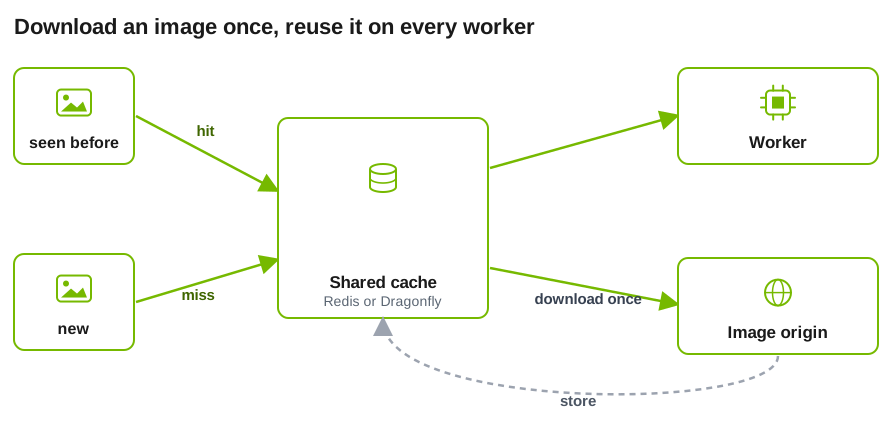
The optional shared cache stores encoded bytes from HTTP and HTTPS image URLs before image decoding. Workers can reuse those bytes across processes while keeping their local decoded-image caches independent. Data URLs, frontend-decoded NIXL inputs, video, and audio do not use this cache.
Backend Support
Dynamo does not provision or discover a cache service. Deploy Redis Cluster or Dragonfly separately and provide a cluster endpoint that every participating URL-loading worker can reach. The connection URL carries the endpoint, authentication, and TLS choice. See Cache Service Deployment for single-node and multi-node layouts.
Set the following environment variables on every participating worker:
Store the full connection URL in a Kubernetes Secret and inject it into each worker rather than placing credentials in a manifest:
Use a rediss:// URL unless Redis traffic is protected by equivalent
transport encryption, such as an encrypted service mesh. A redis:// URL
sends cache data and any URL credentials without TLS and should be used only
on an appropriately secured in-cluster network.
Cache reads and fills run on the request path. A miss waits for Redis SET so
the fill completes before the request returns. Redis errors fail open, and each
cache operation is attempted once. While a cache node is unreachable, an image
load pays one failed GET and one failed SET: each is bounded by
DYN_MM_SHARED_IMAGE_CACHE_CONNECT_TIMEOUT_SECS when a new connection is
refused or times out, and by DYN_MM_SHARED_IMAGE_CACHE_IO_TIMEOUT_SECS when
an open connection stops responding.
Warnings are emitted initially and at most once per minute; individual
operation failures remain available at debug level. Dynamo does not currently
use a bounded asynchronous write queue.
Cache Service Deployment
Dynamo uses the Redis Cluster protocol for both backends. The client uses
DYN_MM_SHARED_IMAGE_CACHE_URL only to discover the cluster: it reads the slot
map from that endpoint and then connects to each node at the address the node
announces. When a node stops responding, the client rediscovers through the same
URL, so point it at an address that survives cache restarts, such as a
Kubernetes Service that selects every cache node, not at an individual pod.
After a restart, the nodes announce their new addresses and workers pick them
up without restarting. Dynamo requires redis-py 6.2 or later.
Single-node Dragonfly. Run Dragonfly with --cluster_mode=emulated so that
it answers Redis Cluster commands, and keep its default announced address (the
pod IP). Do not set --cluster_announce_ip to the host in
DYN_MM_SHARED_IMAGE_CACHE_URL: with redis-py 6.2 through 7.1, a node that
announces the same host and port as the URL removes the URL from the client’s
rediscovery list after one failed operation.
Redis Cluster. Run the nodes as a StatefulSet with a headless Service for per-pod DNS names, plus a regular Service that selects every node for the URL. Configure each node with:
cluster-announce-ipset to the pod IP, orcluster-announce-hostnameset to the pod’s DNS name together withcluster-preferred-endpoint-type hostname(Redis 7.0 or later).cluster-require-full-coverage no, so the remaining nodes keep serving while one node is down. Images that hash to the unavailable node fall back to the origin.- A
nodes.confthat persists across pod restarts, so a restarted node keeps its identity and slots. A rolling restart then keeps the cluster available. If every node restarts at once, all peer addresses change and the nodes need their peers’ new addresses before they can re-form the cluster.
Multi-node Dragonfly. With --cluster_mode=yes, Dragonfly nodes do not
discover each other. A cluster orchestrator must push the slot map with
DFLYCLUSTER CONFIG and push it again whenever a node restarts, because the
map is kept in memory. Point the URL at a Service that selects every node, as
for Redis Cluster.
Session Scoping
Enable DYN_MM_IMAGE_CACHE_SESSION_SCOPED=1 when the same URL can resolve to
different content for different sessions. Dynamo derives the
scope from these headers, in precedence order:
x-dynamo-session-id- Recognized agent headers: Claude Code
x-claude-code-session-id(orx-claude-code-agent-idfor a child agent), Codexthread-id, then OpenCodex-session-id
Use x-dynamo-session-id to provide an explicit Dynamo session identity.
Dynamo normalizes it and the recognized agent headers into both an
AgentContext and the session affinity used for routing and image-cache
scoping.
Session scoping partitions cache entries; it is not an authentication
boundary. Unless a trusted proxy sets or overwrites x-dynamo-session-id,
the caller controls the scope. Configure the proxy to derive this header
from the authenticated identity on every request, and treat scope identifiers
as secrets. A caller that learns another identifier can reuse cached content
stored under that scope for the same URL.
When session scoping is enabled, a missing or blank scope bypasses the local decoded-image cache, in-flight request deduplication, the shared encoded-image cache, and Dynamo-owned image embedding caches. A valid scope partitions all of those caches. The scope does not partition backend KV cache keys; affinity can route a session back to the same worker, but KV identity remains content-based.